Git for Beginners: Basics and Essential Commands
Git is a version control system software developed by Linus Torvalds. It is free open-source software used to track files and to collaborate while writing code for a project. You can download the Git software on your system from the website, which is available for Windows, MacOS and Linux.
Why is Git used?
Git is used for tracking files and collaborating with others while writing code for a project. It simplifies the tracking work that is useful for programmers to know the work done by other programmers.
Types of Version Control Systems
There are three types of version control systems:
Local Version Control System
Centralized Version Control System
Distributed Version Control System
Basics of Git
What is a Repository?
A repository is a collection of files and images. In simple terms, we can say that a repository is known as a folder.
What is a Branching?
Branching is a process used to write code in a different space, with a copy of the main branch code, to create a new functionality or to fix any bugs.
What is a Head?
Head is a pointer to a branch that points to the latest commit.
Working of Git
The working of git is elaborated in the diagram below:
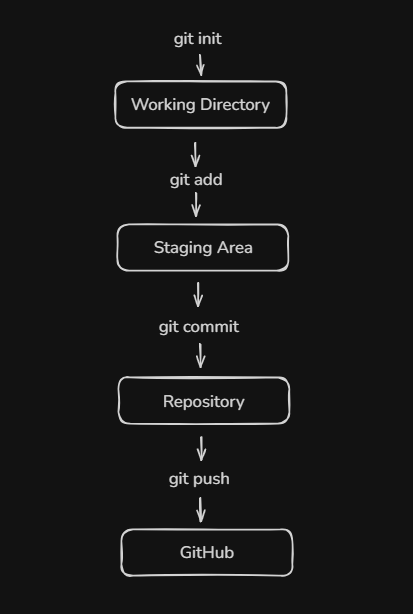
Git is a distributed version control system used for tracking code files. To start tracking code, first we need to use the git init command to initialize the working directory, then we add the newly created files or modified files by using the git add command. To save the changes in the repository, use the git commit command, and finally, to save the changes on the server, like GitHub, use the git push command.
Commonly used Git commands
git init
This command is used to initialize the working directory.
git add .
git add <filename>
This command is used to add the changes to the staging area.
git commit -m “commit message”
This command is used to save the changes in the repository.
git status
This command is used to check the tracking of the files and the commit message.
git branch
This command is used to check the current branch.
git log
This command is used to see the commits.
git log —oneline
This command is used to see the commits in one line.